Pipeline
The main feature of ccanalyser is the end-to-end data processing pipeline. The pipeline has been written using the cgat-core workflow management system and the following diagram illustrates the steps performed by the pipeline:
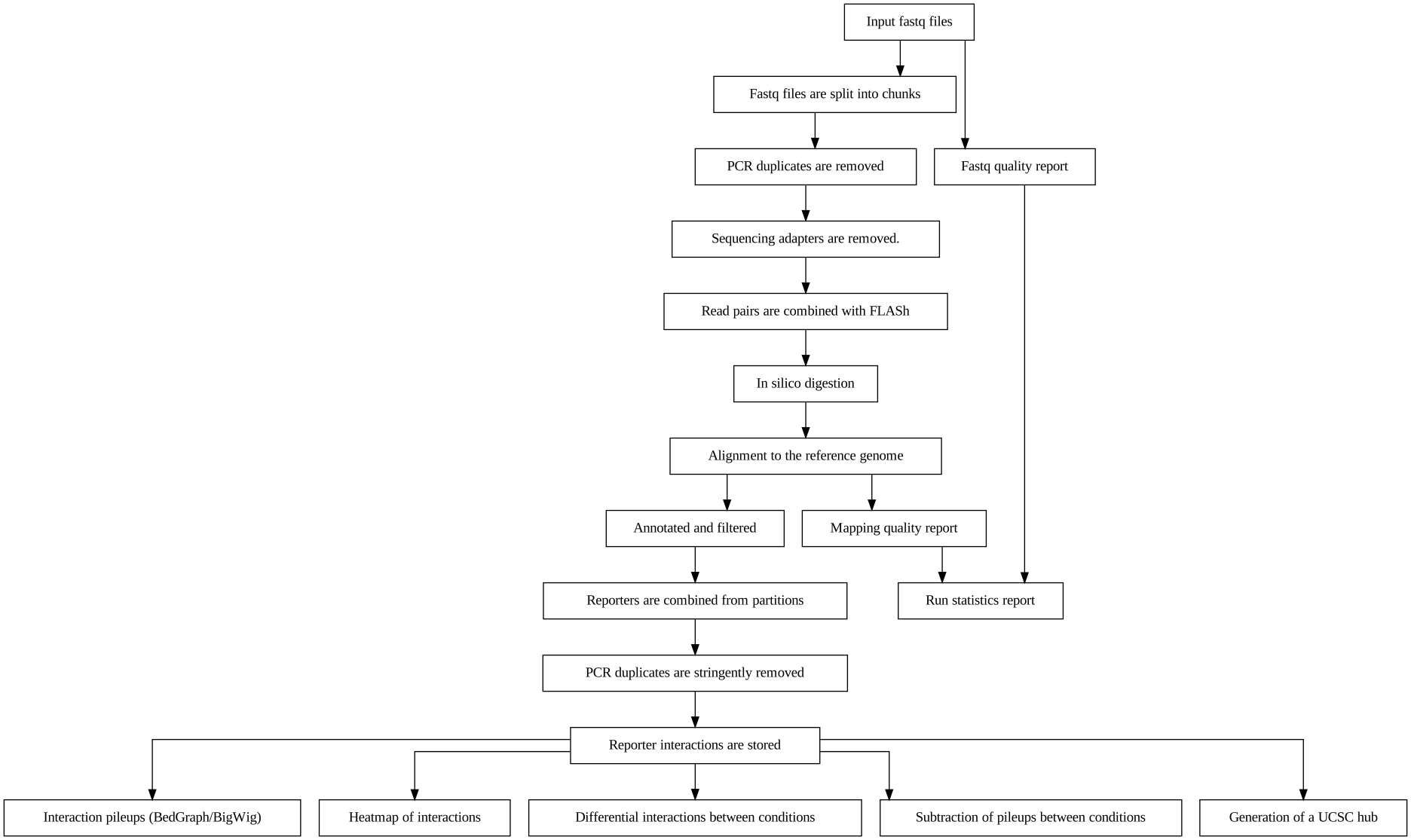
This section provides further details on how to run the pipeline. In essence the pipeline requires a working directory with correctly named FASTQ files and a config.yml file that provides the pipeline configuration.
Step 1 - Create a working directory
To run the pipeline you will need to create a working directory for the pipeline run:
mkdir RS411_EPZ5676/
cd RS411_EPZ5676/
The pipeline will be executed here and all files will be generated in this directory.
Step 2 - Edit a copy of config.yml
The configuration file config.yml enables parameterisation of the pipeline run with user specific settings. Furthermore, it also provides paths to essential files for the pipeline run (e.g., bowtie2 indices). The paths supplied do not have to be in the same directory as the pipeline.
Warning
The yaml file must be named config.yml for the pipeline to recognise it and run correctly.
A copy of config.yml can be downloaded from GitHub using:
wget https://raw.githubusercontent.com/sims-lab/capture-c/master/config.yml
This yaml file can be edited using standard text editors e.g.:
# To use gedit
gedit config.yml

# To use nano
nano config.yml
Step 3 - Copy or link fastq files into the working directory
The pipeline requires that fastq files are paired and in any of these formats:
Here is an example of file pairing for two samples:
Note
Multi-lane FASTQ files should be concatenated prior to running the pipeline
samplename1_R1.fastq.gz
samplename1_R2.fastq.gz
samplename2_1.fastq
samplename2_2.fastq
All FASTQ files present in the directory will be processed by the pipeline in parallel and original FASTQ files will not be modified. If new FASTQ files are added to a pre-run pipeline, only the new files will be processed.
Copy:
cp PATH_TO_FASTQ/example_R1.fastq.gz.
Symlink example:
Warning
Be sure to use the absolute path for symlinks
ln -s /ABSOLUTE_PATH_TO_FASTQ/example_R1.fastq.gz
Step 4 - Running the pipeline
After copying/linking FASTQ files into the working directory and configuring the copy of config.yml in the working directory for the current experiment, the pipeline can be run with:
ccanalyser pipeline
There are several options to visualise which tasks will be performed by the pipeline before running.
The tasks to be performed can be examined with:
# Shows the tasks to be performed
ccanalyser pipeline show

# Plots a directed graph using graphviz
ccanalyser pipeline plot
If you are happy with the tasks to be performed, the full pipeline run can be launched with:
# If using all default settings and using a cluster
ccanalyser pipeline make

# If not using a cluster, run in local mode.
ccanalyser pipeline make --local -p 4

# Avoiding network disconnections
nohup ccanalyser pipeline make &
See cgat-core Read the Docs for additional information.
Step 5 - Running the pipeline to a specified stage
There are currently multiple stopping points built into the pipeline at key stages. These are:
fastq_preprocessing- Stops after in silico digestion of FASTQ files.pre_annotation- Stops before aligned slices are ready to be annotated.post_annotation- Stops after aligned slices have been annotated.post_ccanalyser_analysis- Stops after reporters have been identified and duplicate filtered.full- Run the pipeline until all required tasks are complete.
To run the pipeline until one of these stopping points, use:
# Run until TASK_NAME step
ccanalyser pipeline make TASK_NAME